과제 04 필수구현기능
1. C++ Pawn 클래스 및 컴포넌트 구성

- 컴포넌트 추가
- CapsuleComponent (또는 Box/Sphere 중 택 1)
- SkeletalMeshComponent
- SpringArmComponent
- CameraComponent
	UPROPERTY(VisibleAnywhere, BlueprintReadOnly, Category= "Component")
	UCapsuleComponent* CapsuleComp;
	UPROPERTY(VisibleAnywhere, BlueprintReadOnly, Category= "Component")
	USkeletalMeshComponent* SkeletalMeshComp;
	UPROPERTY(VisibleAnywhere, BlueprintReadOnly, Category= "Camera")
	USpringArmComponent* SpringArmComp;
	UPROPERTY(VisibleAnywhere, BlueprintReadOnly, Category= "Camera")
	UCameraComponent* CameraComp;
- DefaultPawn 설정 : GameMode 클래스에서 DefaultPawnClass를 본인이 만든 Pawn으로 지정.

DefaultPawnClass = AMyCharacter::StaticClass();
- Physics 설정 : 루트 충돌체 및 Mesh의 Simulate Physics를 false로 설정. (물리 대신 코드로 직접 제어)
- 계층 구조 설정 : 충돌 컴포넌트를 RootComponent로 설정하고, 나머지 컴포넌트들을 부착.
	CapsuleComp = CreateDefaultSubobject<UCapsuleComponent>(TEXT("CapsuleComp"));
	SetRootComponent(CapsuleComp);
	CapsuleComp->SetSimulatePhysics(false);

	SkeletalMeshComp = CreateDefaultSubobject<USkeletalMeshComponent>(TEXT("SkeletalMeshComp"));
	SkeletalMeshComp->SetupAttachment(RootComponent);
	SkeletalMeshComp->SetSimulatePhysics(false);

	SpringArmComp = CreateDefaultSubobject<USpringArmComponent>(TEXT("SpringArmComp"));
	SpringArmComp-> SetupAttachment(RootComponent);
	SpringArmComp-> TargetArmLength = 300.0f;
	SpringArmComp -> bUsePawnControlRotation = false;

	CameraComp = CreateDefaultSubobject<UCameraComponent>(TEXT("CameraComp"));
	CameraComp->SetupAttachment(SpringArmComp, USpringArmComponent::SocketName);
	CameraComp -> bUsePawnControlRotation = false;
2. Enhanced Input 매핑 & 바인딩
- 입력 액션(IA) 생성 : 두 가지 액션을 생성. (타입 : Vector2D)
- IA_Move (WASD 이동용)
- IA_Look (마우스 회전용)
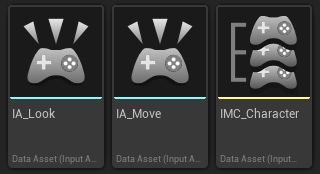
- IMC 매핑 : 생성한 액션들을 Input Mapping Context에 등록하고 키를 할당.
- 액션 바인딩 : SetupPlayerInputComponent()에서 입력 처리 함수와 액션들을 바인딩.
void AMyCharacter::SetupPlayerInputComponent(UInputComponent* PlayerInputComponent)
{
	Super::SetupPlayerInputComponent(PlayerInputComponent);
	if (UEnhancedInputComponent* EnhancedInput = Cast<UEnhancedInputComponent>(PlayerInputComponent))
	{
		if (AMyPlayerController* PlayerController = Cast<AMyPlayerController>(GetController()))
		{
			if (PlayerController -> MoveAction)
			{
				EnhancedInput->BindAction(
					PlayerController -> MoveAction,
					ETriggerEvent::Triggered,
					this,
					&AMyCharacter::Move
					);
			}

			if (PlayerController -> LookAction)
			{
				EnhancedInput->BindAction(
					PlayerController -> LookAction,
					ETriggerEvent::Triggered,
					this,
					&AMyCharacter::Look
					);
			}
		}
	}
}
3. 이동 및 회전 로직 구현
- 프레임 독립성 : DeltaTime을 사용하여 프레임 속도와 관계없이 일정한 속도로 움직이도록 구현.
- 이동 구현 : AddActorLocalOffset()등을 활용해 WASD 입력에 따라 Pawn이 움직이도록 작성.
- 이동 방향은 Pawn의 Forward/Right 벡터를 기준으로 결정.
void AMyCharacter::Move(const FInputActionValue& value)
{
	if (!Controller) return;

	const FVector2D MoveInput = value.Get<FVector2D>();
	const float DeltaTime = GetWorld()->GetDeltaSeconds();

	const FVector Forward = GetActorForwardVector();
	const FVector Right = GetActorRightVector();

	FVector DeltaLocation = FVector::ZeroVector;
	DeltaLocation.X = MoveInput.X * MovementSpeed * DeltaTime;
	DeltaLocation.Y = MoveInput.Y * MovementSpeed * DeltaTime;
	DeltaLocation.Z = 0.0f;

	AddActorLocalOffset(DeltaLocation, true);
}
- 회전 구현 : AddActorLocalRotation() 등을 활용해 마우스 입력에 따라 회전하도록 작성.
- 마우스 입력값으로 Yaw와 Pitch를 직접 계산하여 구현
- 주의 : AddControllerYawInput(), AddControllerPitchInput() 등 엔진 기본 제공 함수는 사용하지 않습니다.
void AMyCharacter::Look(const FInputActionValue& value)
{
	if (!Controller) return;

	const FVector2D LookInput = value.Get<FVector2D>();
	const float DeltaTime = GetWorld()->GetDeltaSeconds();

	// 좌우 회전: 캐릭터 몸 전체 회전
	const float DeltaYaw = LookInput.X * RotationSpeed * DeltaTime;
	AddActorLocalRotation(FRotator(0.0f, DeltaYaw, 0.0f));

	// 상하 회전: SpringArm만 회전
	const float DeltaPitch = LookInput.Y * RotationSpeed * DeltaTime * -1;

	FRotator SpringArmRotation = SpringArmComp->GetRelativeRotation();
	SpringArmRotation.Pitch += DeltaPitch;

	SpringArmRotation.Pitch = FMath::Clamp(SpringArmRotation.Pitch, -60.0f, 30.0f);
	SpringArmRotation.Yaw = 0.0f;
	SpringArmRotation.Roll = 0.0f;

	SpringArmComp->SetRelativeRotation(SpringArmRotation);
}
- 제한 사항 : 평면 상에서의 이동과 회전만 처리하며, 중력이나 낙하 효과는 고려하지 않습니다.