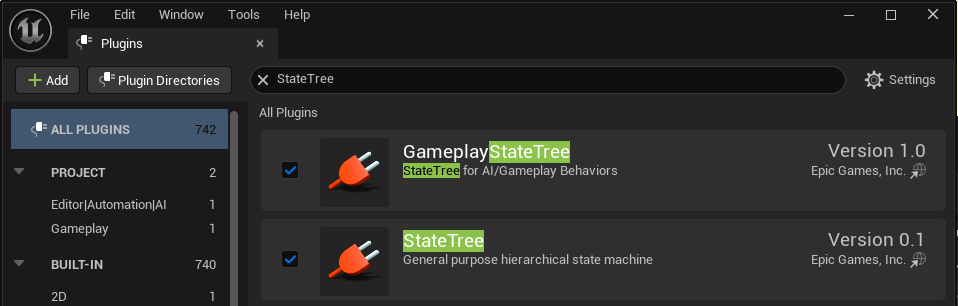
플러그인 활성화

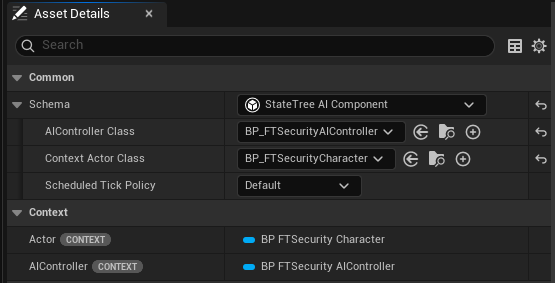
StateTree AI Compponent 선택

트러블슈팅
비상~하향평준화되어버림;; 주말동안 수리 예정..
1. 감지 범위 밖으로 벗어나 있는 상태인데도 계속 추격함. (해결)
원래 구현 목표는 감지범위(노랑, 초록, 시야각)을 벗어나면 마지막으로 목격했던 곳으로 보안요원이 이동하는것입니다. 계속 플레이어를 추격하면 안됨.
2. 공격범위 내에 들어갔다 나오면 추격이 아예 멈춤. 감지범위를 들락날락거려도 가만히있음. (해결)
원래 구현 목표는 공격 범위 안에 있으면 공격을 당하고 그 범위를 벗어나는 즉시 다시 플레이어 추격을 진행.
3. 플레이어가 감지범위 내에 있는 상황에서 ft.Security.TestCall를 했을 때 플레이어를 추격하는게 아닌 신고된 위치로 먼저 이동함. 이동 중 만약 플레이어가 감지범위를 벗어나려하면 그때 플레이어를 추격함. (해결)
원래 구현 목표는 ft.Security.TestCall를 했을 때 플레이어가 감지범위 안에 잇으면 바로 플레이어 추격, 감지 범위 밖에 있다면 신고된 위치로 이동.
bHasSeenTarget을 Perception 이벤트에만 의존하지 않게 변경
매 Tick마다 실제 거리, 시야각, LoseSightRadius, Line of Sight 기준으로 bHasSeenTarget 갱신
ft.Security.TestCall 직후에도 즉시 현재 보이는지 계산
State Tree에서 쓰기 쉽게 bIsTargetInAttackRange, TargetDistance 추가
FTSecurityAIController.h에 추가
UPROPERTY(VisibleAnywhere, BlueprintReadOnly, Category = "FT|Security")
bool bIsTargetInAttackRange = false;
UPROPERTY(VisibleAnywhere, BlueprintReadOnly, Category = "FT|Security")
float TargetDistance = 0.0f;
void UpdateTargetState();
bool IsTargetCurrentlyVisible() const;FTSecurityAIController.cpp에 추가
void AFTSecurityAIController::UpdateTargetState()
{
const APawn* ControlledPawn = GetPawn();
if (!ControlledPawn || !TargetActor)
{
TargetDistance = 0.0f;
bHasSeenTarget = false;
bIsTargetInAttackRange = false;
return;
}
TargetDistance = FVector::Dist(ControlledPawn->GetActorLocation(), TargetActor->GetActorLocation());
bIsTargetInAttackRange = TargetDistance <= AttackRange;
bHasSeenTarget = IsTargetCurrentlyVisible();
}
bool AFTSecurityAIController::IsTargetCurrentlyVisible() const
{
const APawn* ControlledPawn = GetPawn();
if (!ControlledPawn || !TargetActor || !SightConfig)
{
return false;
}
const FVector ToTarget = TargetActor->GetActorLocation() - ControlledPawn->GetActorLocation();
if (ToTarget.SizeSquared() > FMath::Square(SightConfig->LoseSightRadius))
{
return false;
}
const FVector Forward = ControlledPawn->GetActorForwardVector();
const FVector DirectionToTarget = ToTarget.GetSafeNormal();
const float Dot = FVector::DotProduct(Forward, DirectionToTarget);
const float AngleDegrees = FMath::RadiansToDegrees(FMath::Acos(FMath::Clamp(Dot, -1.0f, 1.0f)));
if (AngleDegrees > SightConfig->PeripheralVisionAngleDegrees)
{
return false;
}
return LineOfSightTo(TargetActor);
}기존 State Tree
Idle -> Chase
조건 :
AIController.bSecurityCalled == True
&&
AIController.bHasSeenTarget == True
&&
AIController.TargetActor is Valid
Idle -> Investigate
조건 :
AIController.bSecurityCalled == True
&&
AIController.bHasSeenTarget == False
&&
AIController.TargetActor is Valid
Investigate -> Chase
조건 :
AIController.bHasSeenTarget == True
&&
AIController.TargetActor is Valid
Chase -> Attack
조건 :
Distance from GetActorLocation(Actor) to GetActorLocation(AIController.TargetActor) <= AIController.AttackRange
&&
AIController.TargetActor is Valid
Chase -> Investigate
조건 :
AIController.bHasSeenTarget == False
Attack -> Chase
조건 :
Distance from GetActorLocation(Actor) to GetActorLocation(AIController.TargetActor) > AIController.AttackRange
&&
AIController.bHasSeenTarget == True
&&
AIController.TargetActor is Valid
Attack -> Investigate
조건 :
AIController.bHasSeenTarget == FalseState Tree 조건 변경
Idle -> Chase
조건 :
AIController.bSecurityCalled == True
&&
AIController.bHasSeenTarget == True
&&
AIController.TargetActor is Valid
Idle -> Investigate
조건 :
AIController.bSecurityCalled == True
&&
AIController.bHasSeenTarget == False
&&
AIController.TargetActor is Valid
Investigate -> Chase
조건 :
AIController.bHasSeenTarget == True
&&
AIController.TargetActor is Valid
Chase -> Attack
조건 :
Distance from GetActorLocation(Actor) to GetActorLocation(AIController.TargetActor) <= AIController.AttackRange
&&
AIController.TargetActor is Valid
Chase -> Investigate
조건 :
AIController.bHasSeenTarget == False
Attack -> Chase
조건 :
Distance from GetActorLocation(Actor) to GetActorLocation(AIController.TargetActor) > AIController.AttackRange
&&
AIController.bHasSeenTarget == True
&&
AIController.TargetActor is Valid
Attack -> Investigate
조건 :
AIController.bHasSeenTarget == False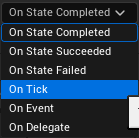
변경 후 생긴 문제 1 (해결)
보안요원이 움직이지 않음. 감지는 잘 되고있는 것으로 확인됨.
(문제 영상) 이면서 이전 문제들의 해결 영상. 감지는 잘 됨.

구조 정리
수정 전

TargetDistance = FVector::Dist(ControlledPawn->GetActorLocation(), TargetActor->GetActorLocation());
bIsTargetInAttackRange = bHasSeenTarget && TargetDistance <= AttackRange;
bHasSeenTarget = IsTargetCurrentlyVisible();
수정 후
TargetDistance = FVector::Dist(ControlledPawn->GetActorLocation(), TargetActor->GetActorLocation());
bHasSeenTarget = IsTargetCurrentlyVisible();
bIsTargetInAttackRange = bHasSeenTarget && TargetDistance <= AttackRange;bIsTargetInAttackRange가 이전 프레임의 bHasSeenTarget을 보고 계산되던 순서를 수정
(해결 영상 이 영상은 왜 링크밖에 안뜨지;;)
문제 2 (해결)
보안요원의 공격범위(빨간 스피어)에서 Idle 상태가 되고 공격하지 않음.
(문제 영상)

Idel -> Chase 추가하여 해결
조건:
bSecurityCalled == true
&& bHasSeenTarget == true
&& bIsTargetInAttackRange == false
&& TargetActor is Valid
(해결 영상)
'내일배움캠프' 카테고리의 다른 글
| 내일배움캠프 언리얼트랙 43일차 - 손님NPC AI Controller, State Tree(2) (0) | 2026.06.23 |
|---|---|
| 내일배움캠프 언리얼트랙 42일차 - 손님NPC AI Controller, State Tree (0) | 2026.06.22 |
| 내일배움캠프 언리얼트랙 40일차 - 보안요원 AI Controller (0) | 2026.06.18 |
| 내일배움캠프 언리얼트랙 38일차 - 심화반 2강 (0) | 2026.06.16 |
| 내일배움캠프 언리얼트랙 35일차 - TA 1강 (0) | 2026.06.11 |